
Use rel="sponsored" on any link that exists because of payment, sponsorship, or an affiliate commission. That covers most affiliate links, paid placements, and banner ads. The attribute is a machine-readable hint for search engines, not a reader-facing disclosure, so it works alongside FTC-style disclosure language rather than replacing it.
TL;DR:
- Using rel="sponsored" correctly tags paid or affiliate links, helping search engines understand the commercial relationship without confusing it with user-generated content.
- The rel attribute should be placed on the anchor tag itself, especially in cases of images, buttons, JavaScript-inserted, or redirect chain links, to ensure proper recognition.
- Combining multiple rel values like "sponsored nofollow" improves compatibility with older tools and crawlers that only recognize nofollow, but duplicating rel attributes in one tag can cause issues.
- A thorough audit of existing links is necessary because many links, especially in templates or older content, may lack proper tagging, which can impact SEO and policy compliance.
- Both clear, visible FTC disclosures and proper rel attributes are essential for legal and SEO guidelines, and neglecting either can lead to compliance or ranking risks.
Table of Contents
- What Rel="Sponsored" Actually Means for SEO
- When You Actually Need to Use It
- How to Add Rel="Sponsored" to Your Links (With Code)
- Combining Rel Values: Sponsored, Nofollow, and UGC
- Testing and Verification: Don't Trust the Editor View
- Rel="Sponsored" Is Not a Disclosure. Here's the Difference.
- The Mistakes That Cost the Most Clicks
- Your Copyable Rel="Sponsored" Cheat Sheet
- Balancing Revenue and Reader Trust
- See What's Actually Broken on Your Site Before You Fix Anything
- Where This Guidance Comes From
- Sources
- FAQ
What Rel="Sponsored" Actually Means for SEO
Google Search Central instructs site owners to mark advertisements, paid placements, and affiliate links with rel="sponsored," and the guidance places that value on the clickable anchor element itself, not a nearby disclosure box or an image's alt text. That is a meaningful distinction from the old, one-size-fits-all approach.
Before 2019, publishers had one tool: rel="nofollow." It told search engines "don't count this link as a vote of confidence," but it lumped affiliate links, blog comment spam, and paid ads into the same bucket. Google's 2019 update split that single signal into three: sponsored, ugc, and nofollow, giving crawlers more context about why a link carries no editorial endorsement.
For paid and affiliate links specifically, sponsored is the preferred value. Nofollow still works and Google will not penalize you for using it, but sponsored describes the commercial relationship more precisely, which matters as scrutiny of affiliate content increases.
When You Actually Need to Use It
The rule is simpler than most style guides make it sound: if a link exists because money changed hands, or because of a material commercial connection, tag it sponsored. That includes standard affiliate links, sponsored blog posts, paid banner placements, and paid widgets embedded through an ad network.
The gray areas trip up more publishers than the clear cases. A product mention in a genuinely independent editorial review, written without payment or a tracking link, does not need sponsored. A reader-submitted link in a comment section falls under ugc, not sponsored, because no payment changed hands even though it is unvetted content. A press sample you were given for free but didn't get paid to promote sits closer to a disclosure question than a rel-attribute one, though many publishers tag it sponsored out of caution.
When in doubt, ask one question: does this link exist because of the payment or partnership? If yes, tag it.
How to Add Rel="Sponsored" to Your Links (With Code)
The implementation itself is a one-line HTML change. On any affiliate or paid link, the anchor tag looks like this:
<a href="https://example.com/product" rel="sponsored">Buy Now</a>
That is the entire mechanism. The complexity comes from the special cases:
- Image and button links: if a product image or a "Shop Now" button wraps in an
<a>tag, the rel attribute has to sit on that<a>element, not on the<img>or<button>inside it. Designers sometimes style a<div>to look like a button while the actual link lives elsewhere in the markup, which is exactly where sponsored tags go missing. - JavaScript-inserted links: links built dynamically through JavaScript, common in comparison tables and affiliate plugins, don't always inherit the rel attribute from a template setting. Confirm the attribute appears in the rendered DOM, not just in your theme's code.
- Link shorteners and redirect chains: if you route affiliate links through a shortener or a redirect plugin, the rel attribute needs to live on the visible anchor the reader clicks, since Google reads the rendered anchor, not the final destination URL.
Combining Rel Values: Sponsored, Nofollow, and UGC
Rel accepts multiple space-separated values in a single attribute, and that syntax is by design, not a workaround. rel="sponsored nofollow" and rel="ugc sponsored" are both valid, and Google's own guidance confirms multiple values are acceptable when a link fits more than one category.
Why stack sponsored with nofollow at all, when sponsored already tells Google the link is paid? Backward compatibility. Some older crawlers, browser extensions, and third-party SEO tools still only recognize nofollow. Adding it alongside sponsored costs nothing and closes that gap for any tool that hasn't caught up to the newer taxonomy.
What you should avoid is writing two separate rel attributes on the same anchor tag. HTML only recognizes the last rel attribute if you duplicate it, silently dropping the first one. Keep it to one rel attribute with space-separated values, always, and never split sponsored and nofollow into two competing declarations.
Testing and Verification: Don't Trust the Editor View
A CMS plugin toggle that says "mark as sponsored" tells you what the editor interface intends to do. It does not tell you what actually shipped to the page. The only reliable check is inspecting the rendered anchor in your browser's DevTools, because a common implementation failure is tagging new links correctly while every link published before the plugin was installed goes untouched.
Run this three-step check on a representative sample:
- Pull up an old post from your archive, not just recent content, and inspect the anchor tags for affiliate links.
- Check a comparison table or product roundup block, since these often get built once and reused across dozens of pages without anyone re-auditing the underlying HTML.
- Load the mobile view separately. Some themes render a different anchor structure on mobile breakpoints, and the rel attribute doesn't always carry over.
Sort what you find into three categories: Broken (the link doesn't work or leads somewhere unintended), Needs Attention (it loads but something about the tagging, destination, or tracking path looks off), and Healthy (correctly tagged and functioning as intended). Fix Broken links first.
Pro Tip: Reusable content blocks are the highest-leverage fix on most sites. One missing rel attribute in a template used across fifty posts is fifty pages with the same gap, and fixing the template fixes all fifty at once.
Rel="Sponsored" Is Not a Disclosure. Here's the Difference.
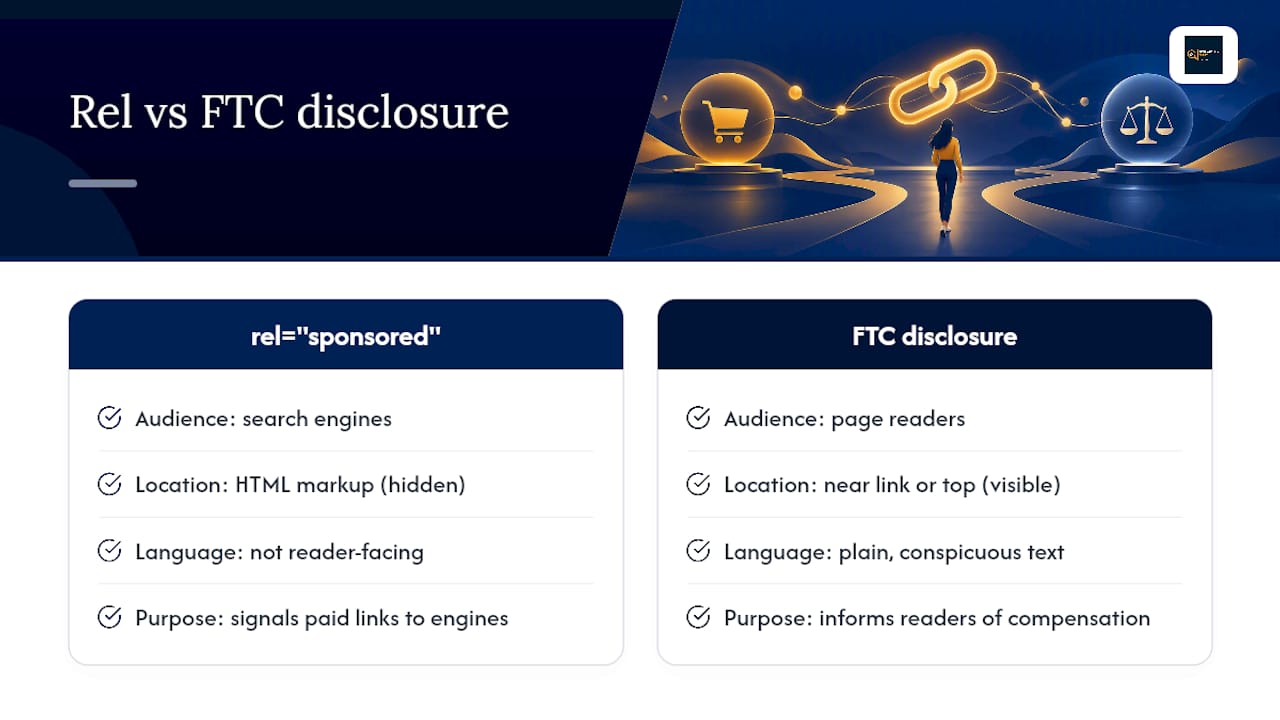
Rel="sponsored" talks to search engines. It says nothing to the person reading your page, because it lives in HTML markup a reader never sees. The FTC's rules operate on a completely different axis: they require clear, conspicuous, reader-facing disclosure placed near the link itself, written in plain language a reader can't miss.
The FTC's own guidance gives usable examples of language that clears the bar: a line reading "I get commissions for purchases made through links in this post" near the top of an article, or a simple label like "Sponsored" attached to the specific placement, drawn from the FTC's influencer disclosure guide. Neither requires legal phrasing. Both need to sit where the reader is actually looking, not buried in a footer or an "About" page three clicks away.
Treat the two systems as separate checkboxes. Adding rel="sponsored" and skipping the visible disclosure leaves you exposed on the legal side. Adding a disclosure and skipping the rel attribute leaves you noncompliant with search engine policy. You need both, every time.
The Mistakes That Cost the Most Clicks
Three mistakes account for most of the damage: tagging the outer container instead of the actual <a> element, trusting a visual editor's "nofollow/sponsored" toggle without checking the rendered page, and auditing only new content while years of older posts sit untouched.
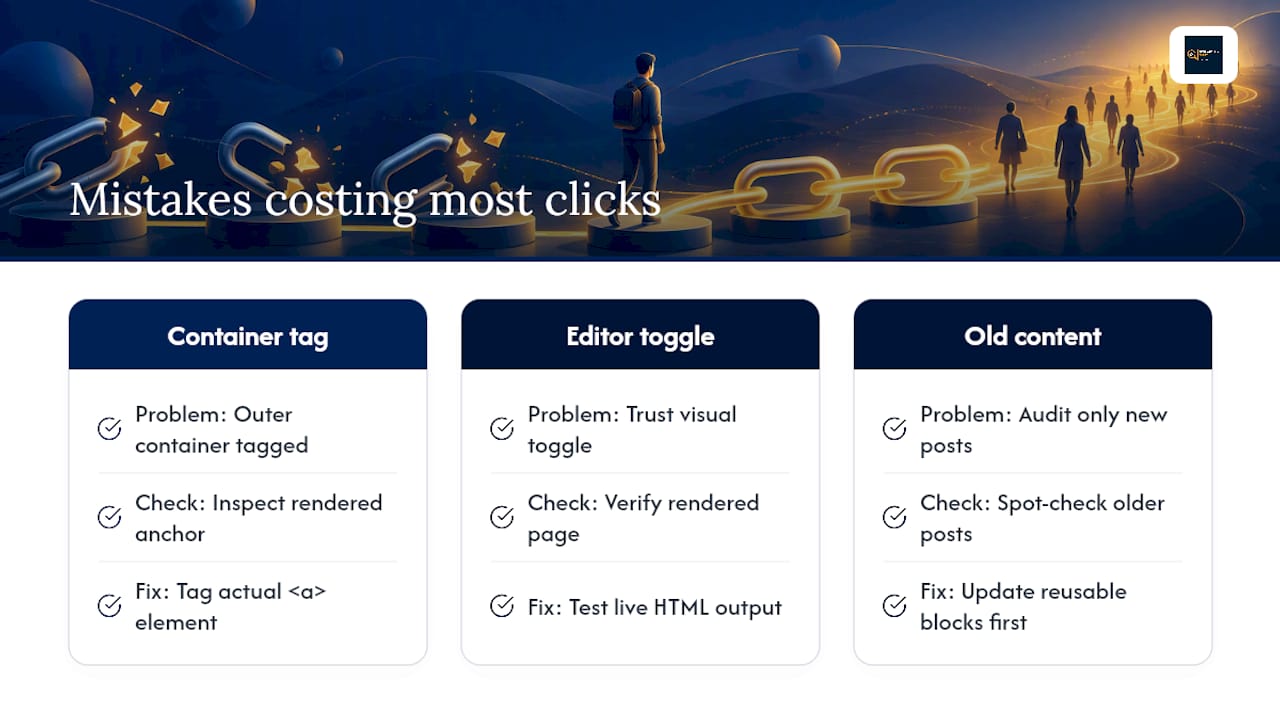
The fix is a habit, not a one-time project. Run periodic spot checks across old and new content, update your reusable blocks first since they multiply the problem, and add link-adjacent disclosure language anywhere it's missing.
Classify every issue you find as Broken, Needs Attention, or Healthy, and work down that list in order. It's worth noting that correct rel tagging reduces policy risk but doesn't shield thin affiliate pages from quality scrutiny on its own. The attribute is necessary. It isn't sufficient.
Your Copyable Rel="Sponsored" Cheat Sheet
- Rule 1: Payment or a material commercial connection created the link. Tag it sponsored.
- Rule 2: A reader submitted the link with no payment involved. Tag it ugc.
- Rule 3: You want maximum compatibility across tools. Combine values:
rel="sponsored nofollow".
Snippets to copy:
<a href="URL" rel="sponsored">Anchor Text</a><a href="URL" rel="sponsored nofollow">Anchor Text</a>
Three-step test: inspect the rendered anchor in DevTools, check one old post and one reusable block, confirm mobile view matches desktop.
Balancing Revenue and Reader Trust
Correct rel usage is low-friction risk reduction. It takes minutes to implement on a template and protects you from a policy conversation you don't want to have. The bigger cost most publishers underestimate isn't the tagging itself. It's the years of legacy content nobody revisits, where links quietly stop earning while the traffic keeps arriving.
A recurring audit habit, starting with a free sample and escalating to a full review only where it's warranted, catches that leakage before it compounds. The technical fix is trivial. The discipline of checking is where most sites actually fall short.
— Michael .N
See What's Actually Broken on Your Site Before You Fix Anything
Most link checkers stop at a 404 error. Some link checkers go further by identifying links that return a normal 200 status but may be commercially dead: products pulled from the shelf, redirects dumped onto a generic homepage, or tracking paths that may no longer be effective. We don't verify actual commission crediting or guarantee recovered revenue. We surface the evidence, classify each link as Broken, Needs Attention, or Healthy, and hand you a prioritized action plan so you decide what to fix first.
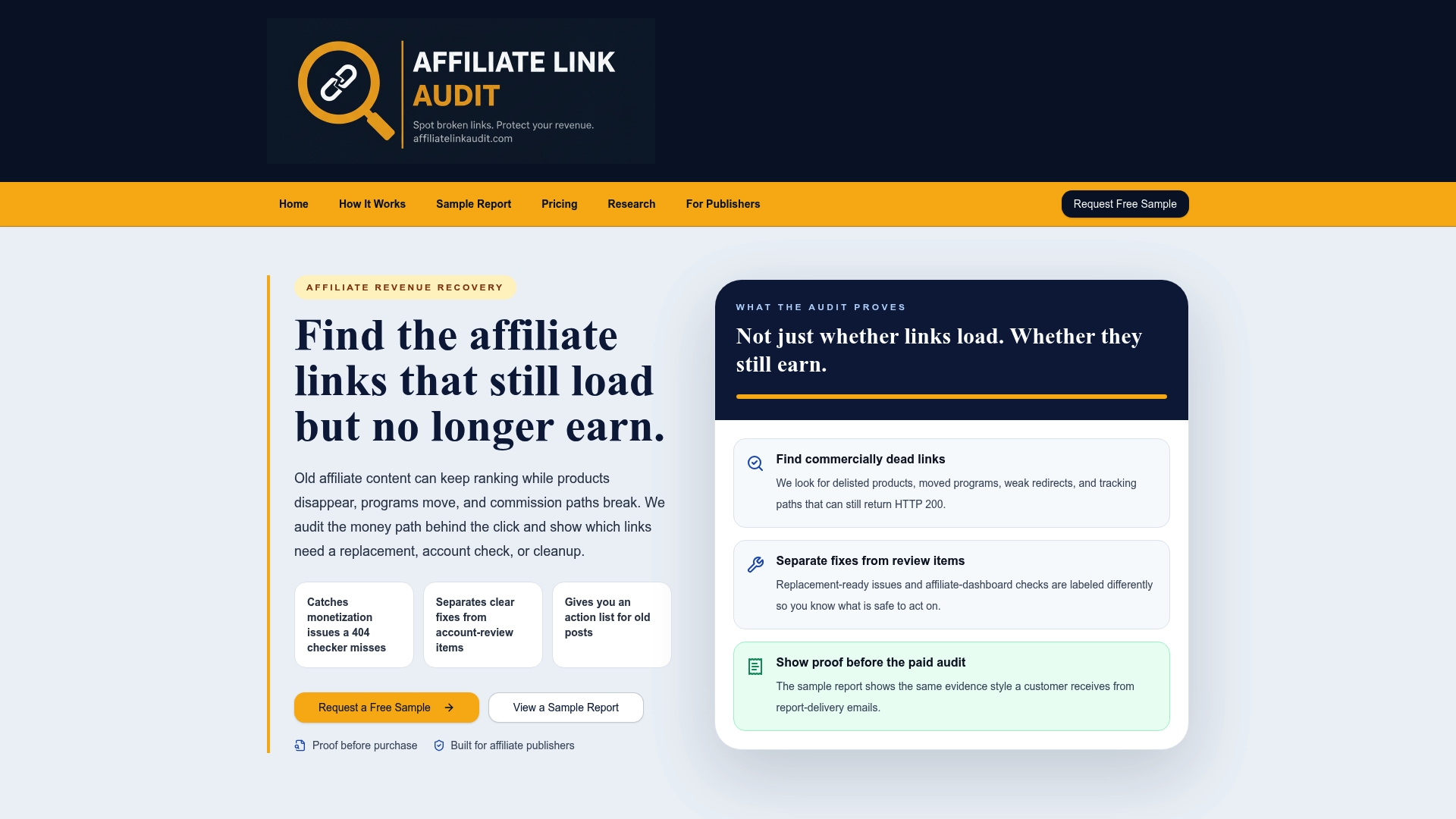
Every engagement starts with a free sample report, so you see real findings from your own site before spending anything. If the sample turns up issues worth chasing, the Full Audit runs $97 one time and covers your published anchors, tracking paths, and redirect chains in full. Request your free sample now and see what your last two years of content are actually pointing to.
Where This Guidance Comes From
The rules in this guide track directly to primary sources, not secondhand summaries. Google's own outbound link qualification guidance covers the technical rel implementation, while the 2021 link spam update announcement explains common tagging failures. The FTC's endorsement guide FAQ governs the reader-facing disclosure side, and Awin's affiliate platform documentation shows how one major network handles automated tagging.
Sources
- Qualify your outbound links to Google | Google Search Central
- FTC's endorsement guides: What people are asking
FAQ
What does rel mean in a link?
Rel stands for "relationship" and describes how the linked page relates to the page linking to it. On an anchor tag, values like sponsored, ugc, and nofollow tell search engines the nature of that connection, whether paid, user-submitted, or simply not endorsed.
What are the different rel values?
The main values relevant to affiliate and paid content are sponsored, ugc, and nofollow, and Google allows combining them in one space-separated attribute. Sponsored covers paid and affiliate links, ugc covers user-generated content like comments, and nofollow signals a general non-endorsement.
What is a sponsored link?
A sponsored link is any link that exists because of payment, an affiliate commission, or another material commercial relationship. Google's guidance asks publishers to mark these links with rel="sponsored" on the anchor element so search engines understand the commercial context.
Are nofollow links good for SEO?
Nofollow links aren't harmful to your SEO when applied correctly, but sponsored is the more precise and preferred value for paid or affiliate links specifically. Google treats these values as hints rather than strict directives, so using the right one signals accuracy without functioning as a ranking penalty or a ranking shield.
Does rel="sponsored" satisfy FTC disclosure rules?
No. Rel="sponsored" is machine-readable markup that search engines read, while the FTC requires a separate, clear, reader-facing disclosure placed near the link itself. You need both the attribute and the visible disclosure language.
How much does an Affiliate Link Audit cost?
The Full Audit is priced at $97 as a one-time purchase, available directly through Affiliate Link Audit. A free sample report is also available at no cost for readers who want to see findings before committing to the full service.
Recommended
- Affiliate Link Audit for Publishers
- Sample Affiliate Revenue Audit Report
- Affiliate Link Health Benchmark 2026
- Affiliate Link Health Research
Created with BabyLoveGrowth to create better content
This article was produced with AI assistance and reviewed for accuracy. Findings language ("Broken," "Needs Attention," "Healthy") reflects Affiliate Link Audit's evidence-based classification system.